BitLocker zero-day (YellowKey): access to encrypted drives, PoC public, but TPM+PIN stops it
by Claudiu Hulea · IT Management Consultant
A researcher has published the PoC for YellowKey (CVE-2026-45585), a zero-day that bypasses BitLocker encryption on Windows 11 and Windows Server 2022/2025 and gives access to the drive contents. The good news, buried in the headlines: a correct configuration (TPM+PIN) stops it. Below: how it works and what you should have enabled.
In brief
- YellowKey — a BitLocker bypass the researcher classifies as a “backdoor”. CVE-2026-45585 (assigned by Microsoft after disclosure).
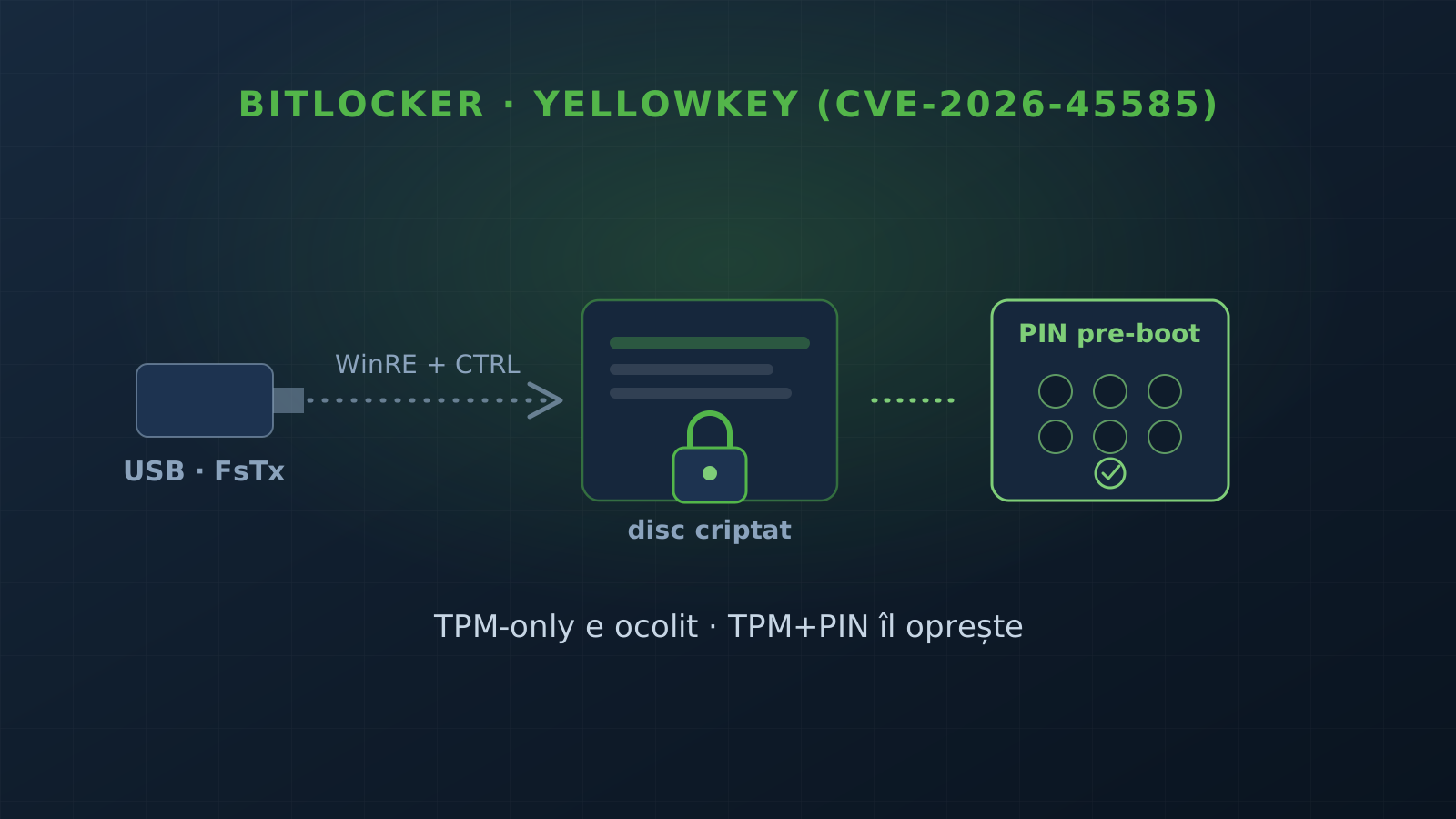
- Mechanism: specially crafted NTFS “FsTx” files on a USB or the EFI partition, then a boot into WinRE + the CTRL key → a command shell with storage access.
- Needs physical access; works on TPM-only BitLocker, NOT on TPM+PIN.
- Limit: it does not work on a drive stolen on its own — it needs the original device, where the TPM holds the keys.
- PoC public since 13 May 2026, by researcher Chaotic Eclipse (a.k.a. Nightmare-Eclipse), who cited dissatisfaction with how Microsoft handled the vulnerability.
- Mitigation (Kevin Beaumont): BitLocker PIN + a BIOS password.
How YellowKey works
BitLocker with TPM-only unlocks the drive automatically at boot, without asking the user for anything — the key sits in the TPM and is released if the boot state looks valid. Convenient, and that is exactly the weakness.
YellowKey exploits NTFS transactions: an attacker with physical access places crafted “FsTx” files on a USB drive or the EFI partition, reboots into the Windows Recovery Environment (WinRE) and holds the CTRL key. That triggers a command shell with unrestricted storage access — to the data on the “encrypted” drive that the TPM has just unlocked by itself.
The detail that matters: the attack does not work on a drive stolen out of the laptop. It needs the original device, because that TPM releases the keys. It is an “attacker reaches your machine” scenario (evil-maid, an unattended laptop), not “they stole my SSD”.
Why TPM+PIN changes everything
The difference is simple: with TPM+PIN, the drive does not unlock until you enter a pre-boot PIN. The TPM no longer releases the key based on boot state alone, so the WinRE + CTRL trick no longer reaches the data. That is why the attack is explicitly marked as not working on TPM+PIN.
And a second problem: GreenPlasma
In the same write-up, the researcher also released GreenPlasma — a local privilege escalation (“Windows CTFMON Arbitrary Section Creation”): unprivileged users create arbitrary memory-section objects in SYSTEM-writable directories to manipulate privileged services/drivers. The PoC is incomplete (a full SYSTEM shell still needs work), but it is worth watching.
Microsoft said it is investigating and supports coordinated disclosure, with no specific patch timeline in this write-up.
Our recommendations
If you have laptops with sensitive data or a fleet of workstations, here is what to configure so you do not depend on a patch:
- BitLocker with pre-boot authentication (TPM+PIN), not TPM alone. It is the layer that stops YellowKey directly. For a device fleet, it can be enforced centrally by policy. Part of the security audit and endpoint hardening.
- A BIOS/UEFI password + a locked boot order. Disable USB boot and lock the firmware settings so an attacker with physical access cannot boot into WinRE from a stick.
- Physical-access hygiene. The threat model is “someone reaches the device” — policies for unattended laptops, lock-on-leave, encryption + pre-boot auth as the standard across the fleet.
Want to check where you stand on encryption and endpoint hardening? Get in touch and we start with an audit.
Frequently asked questions
What does YellowKey do?
It bypasses BitLocker encryption and gives access to the drive contents. The researcher classifies it as a "backdoor". It affects Windows 11 and Windows Server 2022/2025 and has CVE-2026-45585, assigned by Microsoft after disclosure.
How does it work, technically?
It exploits NTFS transactions: the attacker places specially crafted "FsTx" files on a USB drive or the EFI partition, then reboots into the Windows Recovery Environment (WinRE) and holds the CTRL key — which triggers a command shell with unrestricted storage access.
Am I vulnerable?
It depends on the configuration. The attack needs physical access to the device and works on TPM-only BitLocker. It does NOT work on TPM+PIN, and it does NOT work on a drive stolen on its own — it needs the original device, where the TPM holds the keys.
How do I protect myself?
Enable BitLocker with pre-boot authentication: TPM+PIN (not TPM alone). Add a BIOS/UEFI password and lock USB boot. Security researcher Kevin Beaumont recommends exactly the BitLocker PIN + a BIOS password.