
Notepad++ plugins abused to stealthily install malware
by Claudiu Hulea · IT Management Consultant
CERT-UA has described a campaign in which attackers use legitimate Notepad++ as the vehicle: alongside it they ship a malicious “plugin” that the application loads on its own, through its normal mechanism. It isn’t, strictly, a vulnerability — it’s abuse of legitimate functionality (DLL side-loading), combined with social engineering. Below are the facts and how to defend.
In brief
- Discovered by: CERT-UA (Ukraine). Attributed to the UAC-0099 cluster, previously linked to providing initial access for APT44 (Sandworm).
- Mechanism: DLL side-loading — a malicious DLL placed where Notepad++ expects a plugin gets loaded automatically by the legitimate application.
- Nature: feature abuse, not a classic exploit. A DLL-hijacking classification was assigned CVE-2025-56383, but the Notepad++ team disputes it (they say plugin loading is standard behaviour). A fix shipped anyway in v8.9.7; the version used in the malicious package was v8.8.3.
How does the attack work?
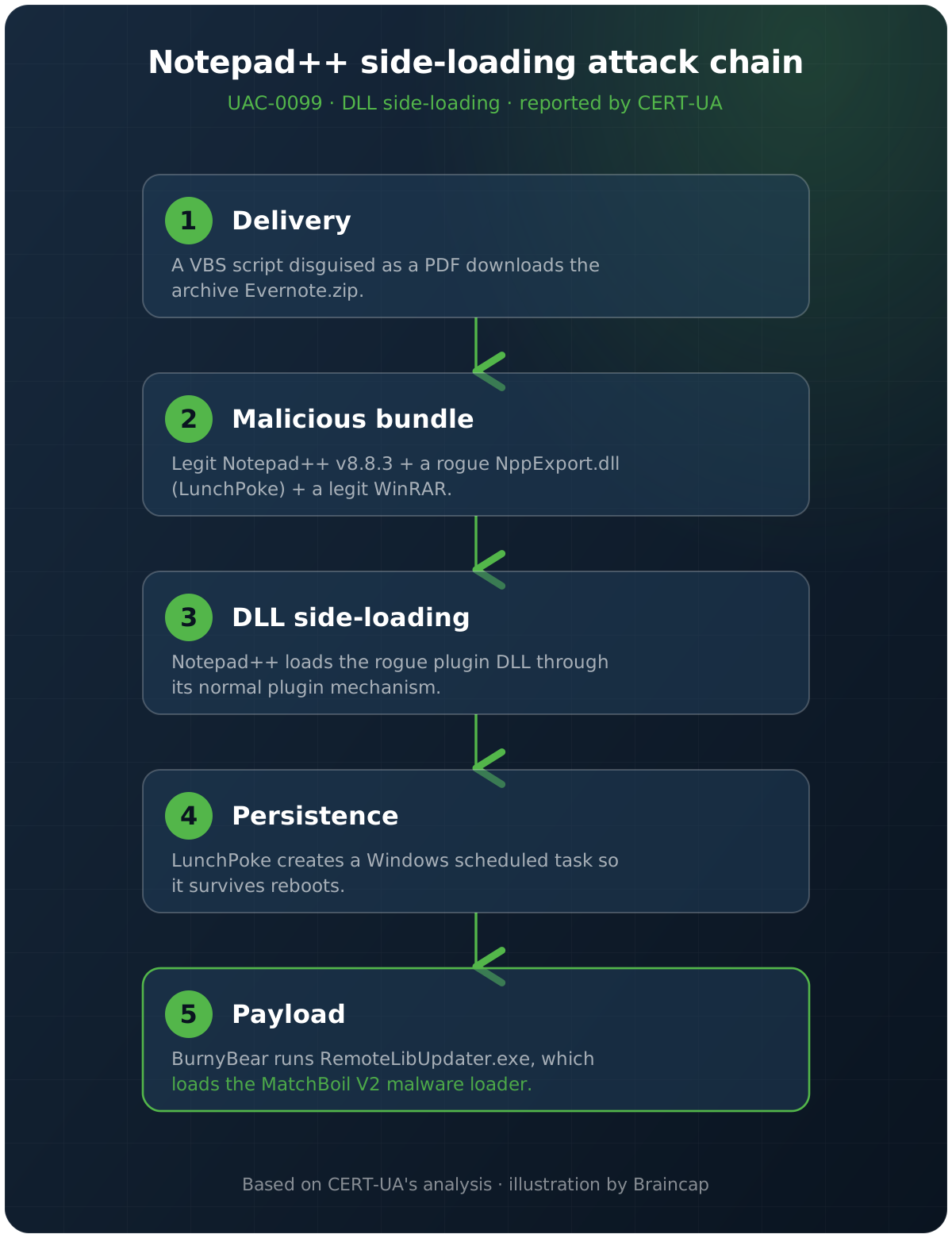
- Delivery: the victim receives a VBS script disguised as a PDF document. It downloads an
Evernote.ziparchive. - The package: the archive contains legitimate Notepad++ v8.8.3, a malicious
NppExport.dll(a tool named LunchPoke), a password-protectedupdater.rar, and a legitimate WinRAR. - Execution: the script installs everything into a randomly named directory and launches Notepad++, which loads the malicious
NppExport.dllthrough its normal plugin mechanism. - Persistence: LunchPoke creates a Windows scheduled task.
- Payload chain: LunchPoke extracts
RemoteLibUpdater.exeandInitTest.dllfrom the RAR; the BurnyBear loader runsRemoteLibUpdater.exe, andInitTest.dllis the MatchBoil V2 malware loader.
Why does it stay under the radar?
- a legitimate, signed application (Notepad++) used as cover for malicious code;
- the malicious DLL disguised as the standard
NppExport.dllplugin; - the VBS script masked as a PDF file;
- installation into randomly named directories;
- legitimate tools (WinRAR) repurposed for extraction;
- silent persistence through a scheduled task.
Vulnerability or feature abuse?
Here’s the important nuance: Notepad++ loads plugins (DLLs) from its location — normal behaviour that thousands of legitimate plugins rely on. The attacker simply places a malicious DLL in the right path and lets the app load it. That’s why the Notepad++ team disputes the “vulnerability” label. In practice, though, DLL side-loading through legitimate applications is one of the most common ways to run code quietly and avoid raising suspicion.
The takeaway, and how to defend
- Don’t run software from unsolicited archives. A “PDF” that is actually a
.vbs, a ZIP with a “legitimate” executable plus extra files — those are clear red flags. - Update (CERT-UA’s advice): Notepad++ to v8.9.7, 7-Zip to v26.02, WinRAR to v7.23.
- Monitor scheduled-task creation and DLL loading from unusual locations — a properly configured EDR catches exactly this pattern (side-loading + scheduled task).
- Install applications from official sources, not from “ready-made” packages received by e-mail or messaging.
Sources
- BleepingComputer — Hackers abuse Notepad++ plugins to stealthily install malware
- Analysis: CERT-UA (campaign attributed to UAC-0099)
Frequently asked questions
What is the Notepad++ plugin campaign?
A campaign described by CERT-UA (attributed to the UAC-0099 cluster) in which attackers ship legitimate Notepad++ together with a malicious DLL disguised as a plugin (NppExport.dll). The legitimate app loads it on its own, through its normal plugin mechanism — DLL side-loading — and installs persistent malware.
Is it a vulnerability in Notepad++?
It is disputed. Plugin loading is standard behaviour that thousands of legitimate plugins rely on; the Notepad++ team disputes the vulnerability label. A DLL-hijacking classification was assigned CVE-2025-56383, and a fix shipped in v8.9.7 (the malicious package used v8.8.3). In practice, it is abuse of legitimate functionality.
How does the malware get onto the system?
The victim receives a VBS script disguised as a PDF, which downloads an archive with legitimate Notepad++ plus the malicious LunchPoke DLL. On launch, Notepad++ loads the DLL, which creates a scheduled task and runs a payload chain (BurnyBear, MatchBoil V2).
How do I defend against it?
Don't run software from unsolicited archives (a "PDF" that is actually a .vbs is a clear red flag), update (Notepad++ 8.9.7, 7-Zip 26.02, WinRAR 7.23), install apps only from official sources, and monitor scheduled-task creation and DLL loading from unusual locations — an EDR catches exactly this pattern.