VMware ESXi ransomware: how one strike encrypts all your virtual machines
by Claudiu Hulea · IT Management Consultant
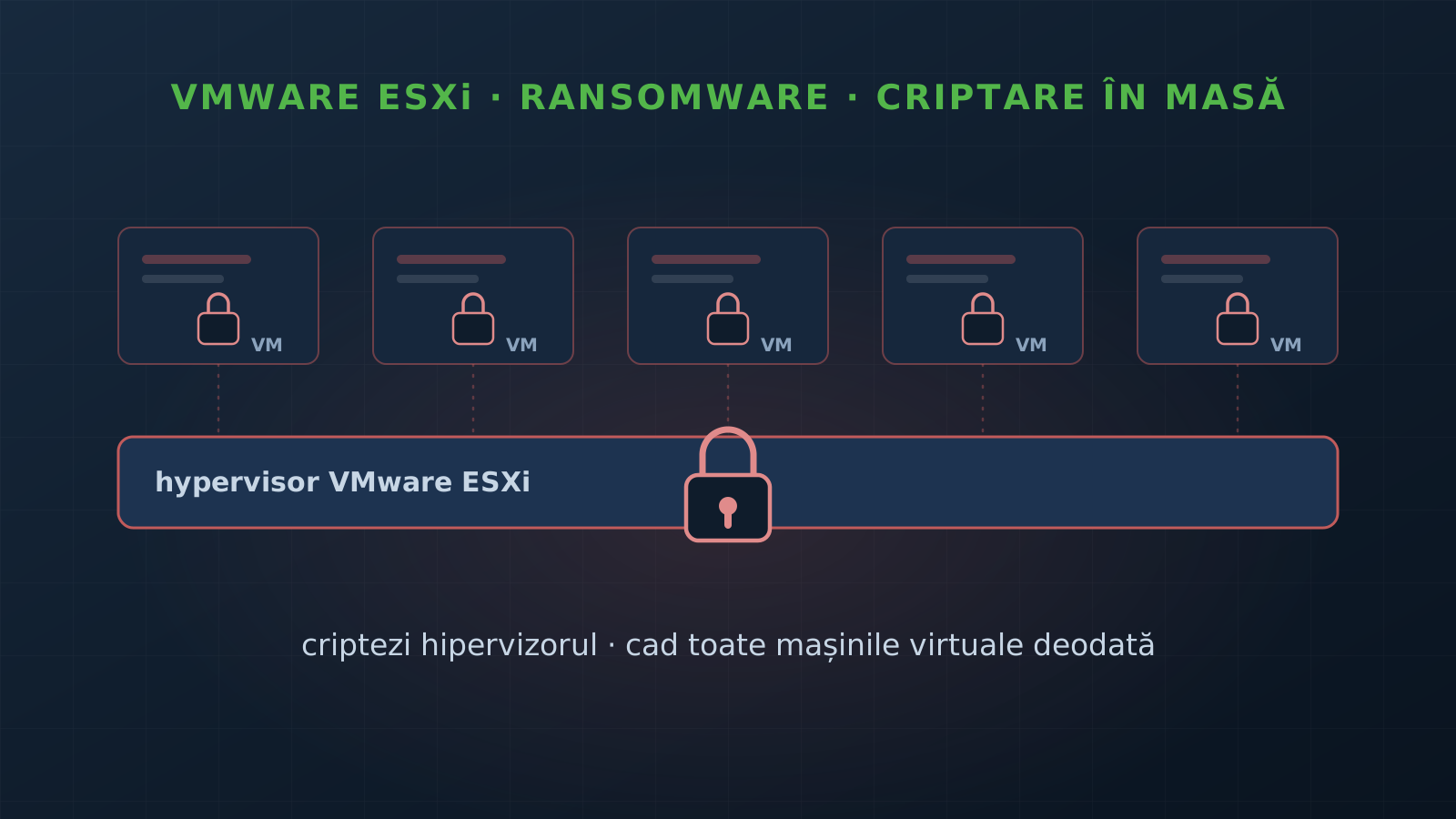
There is a scenario every virtualization admin has nightmares about: not one server down, but all of them at once. That is what happens when ransomware reaches the VMware ESXi hypervisor — the layer every virtual machine runs on. It does not encrypt one server; it encrypts the one beneath them all. It is the most feared scenario in virtualized infrastructure, and the financial sector is a prime target.
Why the hypervisor is the perfect target
A hypervisor hosts dozens or hundreds of virtual machines, each with its own disk (.vmdk). If an attacker encrypts the ESXi file system, all the VMs above it become unusable in a single move. Microsoft puts it plainly: encrypting an ESXi hypervisor enables “one-click mass encryption, as hosted VMs are impacted”.
There are two reasons ESXi is so attractive:
- Maximum leverage. A single point of compromise = the whole data center down. No need to move laterally through hundreds of servers.
- A security blind spot. Many EDR/antivirus products do not run on ESXi (it is an appliance-style system, not an ordinary Windows/Linux host). The attack unfolds exactly where your monitoring sees the least.
That is why the major ransomware groups have shifted, over recent years, from “encrypt the endpoints” to “encrypt the hypervisor”.
How attackers reach ESXi
It is not magic — there are a few well-documented paths:
- CVE-2024-37085 — ESXi authentication bypass. On hypervisors joined to an Active Directory domain, any member of a group named “ESX Admins” gets full administrator access by default. The flaw, described by Microsoft: ESXi does not validate that the group actually exists and identifies it by name, not by SID. The consequence: an attacker who already has rights in AD simply creates an “ESX Admins” group, adds an account — and has administrator on the hypervisor. Linked to actors such as Storm-0506, Storm-1175, Octo Tempest, Manatee Tempest and families like Akira, Black Basta, Babuk, LockBit, Kuiper.
- CVE-2021-21974 — OpenSLP. The flaw exploited in the massive ESXiArgs campaign of February 2023, which encrypted thousands of ESXi servers exposed to the internet — many unpatched for two years. CISA released guidance and a recovery script at the time.
- The boring but most common path: valid credentials + access to vCenter or the management interface. A stolen admin account (phishing, VPN, infostealer) and a network-reachable ESXi management are enough. From there,
esxclipowers off the VMs and starts encryption.
Our recommendations
An attack on the hypervisor is not defended with a single button, but with layers. Here is what directly reduces the risk:
- Backup isolated from the hypervisor. This is the lifeline. Immutable/offline copies of the VMs, on separate infrastructure from the domain and virtualization production runs on — unreachable by an attacker who owns the ESXi. Plus a rehearsed restore, with a measured RTO/RPO. A backup that sits on the same vCenter is encrypted with everything else. Part of the security audit.
- Isolate the vSphere management plane. ESXi and vCenter have no business being exposed — not on the internet, not flat in the LAN. A separate management network, jump-host access, SSH and OpenSLP disabled, lockdown mode, MFA on vCenter. Monitoring and periodic review catch mass VM shutdowns and anomalous administrative access — the signals that precede encryption.
- Patch + harden the “ESX Admins” group. Apply the VMware patches, disable auto-add (
Config.HostAgent.plugins.hostsvc.esxAdminsGroupAutoAdd), and use a dedicated group, not one named generically “ESX Admins”. That is exactly the CVE-2024-37085 vector. - Test the real surface. A security test checks whether an attacker reaches vCenter/ESXi from their position and how far they get — before the incident, not during it.
The golden rule is the same as for any ransomware, only the stakes are higher: if a single compromise can encrypt your entire data center, the question is not “can I keep them out”, but “what do I restore, from where, and how fast”.
Want to know how exposed your virtualization layer is? Get in touch and we start with an audit.
Frequently asked questions
Why is the ESXi hypervisor such a high-value ransomware target?
Because every virtual machine runs on it. Per Microsoft, encrypting an ESXi hypervisor file system enables "one-click mass encryption, as hosted VMs are impacted" — an attacker no longer has to hit each server individually, but hits the layer beneath all of them. On top of that, many security products (EDR) have limited visibility and protection on ESXi, so the attack often unfolds in a blind spot.
How do attackers gain control of ESXi?
Several documented paths: CVE-2024-37085 — an authentication bypass on domain-joined ESXi hosts, where any member of an Active Directory group named "ESX Admins" gets full administrator access by default (the attacker simply creates that group); CVE-2021-21974 — the OpenSLP flaw exploited in the massive 2023 ESXiArgs campaign that encrypted thousands of ESXi servers; or, most simply, valid credentials and access to vCenter/management.
Which ransomware families do this?
Per Microsoft, exploitation of CVE-2024-37085 has been linked to actors such as Storm-0506, Storm-1175, Octo Tempest and Manatee Tempest, with ransomware families including Akira, Black Basta, Babuk, LockBit and Kuiper. The leaked Babuk builder spawned many ESXi-specific "lockers".
Will backups save me?
Only if they are isolated from the attacker. If backups sit on the same virtualization infrastructure (or are reachable from the compromised domain), they get encrypted with everything else. What saves you is immutable/offline copies, on separate infrastructure, plus a rehearsed recovery plan — not just a documented one.