Hotel Wi-Fi attacks (CaptiveCrunch): how Microsoft 365 accounts get breached, and how to defend
by Claudiu Hulea · IT Management Consultant
Microsoft and security company ReliaQuest have documented CaptiveCrunch, a campaign that turns hotel and conference-center Wi-Fi into a beachhead: it steals credentials and Microsoft 365 session tokens from people on the move. It is attributed to Russian actor Midnight Blizzard (APT29), via a sub-cluster called Storm-2945. The good news: the defense does not depend on the network at reception — it depends on how your account is configured.
In brief
- CaptiveCrunch — a campaign targeting travelers through hotel/conference Wi-Fi, attributed to Midnight Blizzard (APT29) / the Storm-2945 sub-cluster.
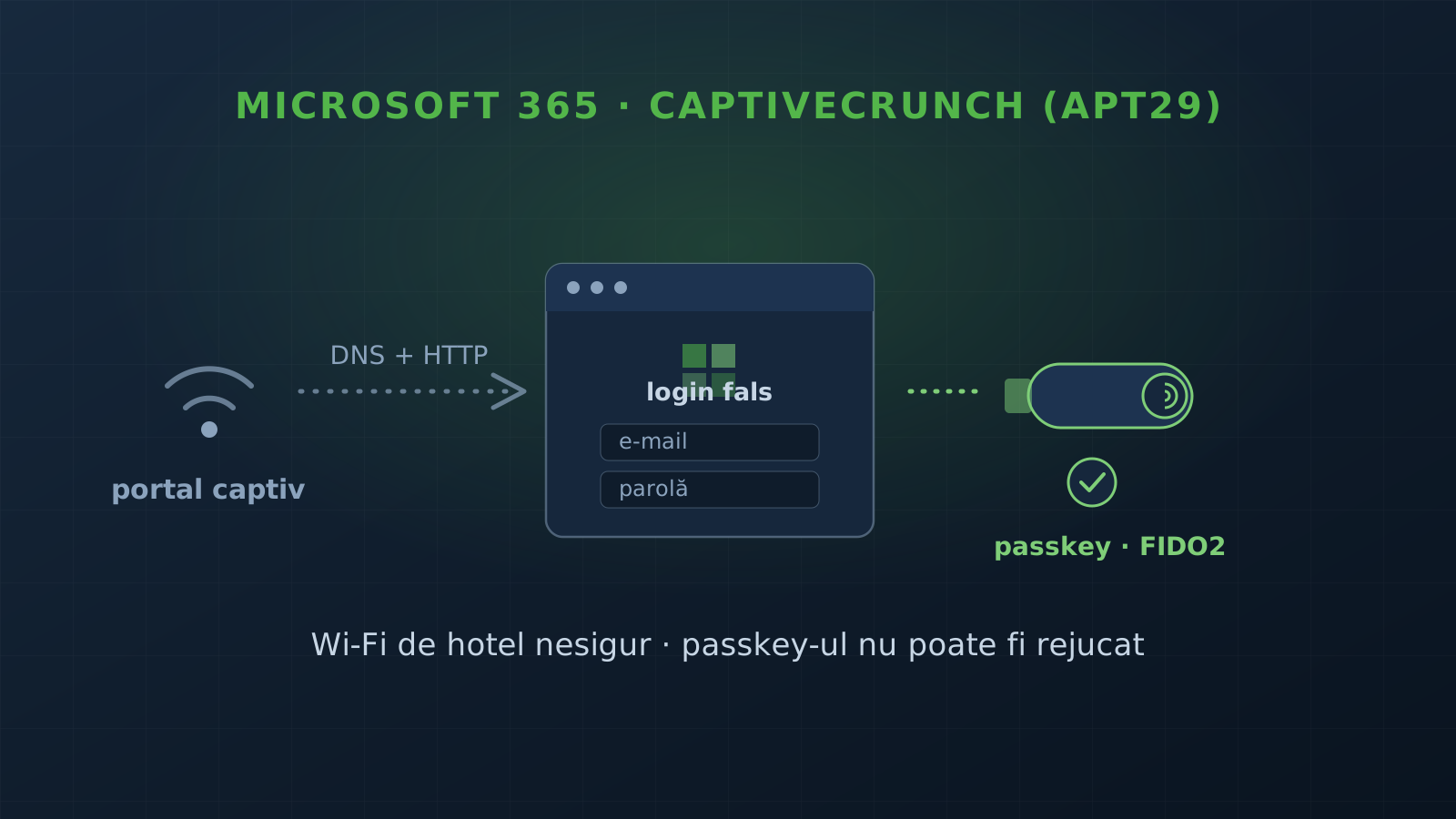
- Mechanism: attackers manipulate DNS and HTTP on the captive-portal equipment and redirect to phishing or fake updates.
- Three breach paths: Microsoft 365 phishing pages, device code phishing (abuse of the Microsoft Entra ID flow), and fake browser/OS updates via ClickFix prompts.
- Custom malware: CornFlake (Go RAT) and ChocoShell (in-memory PowerShell stealer) — steal passwords, cookies, and Microsoft 365 / Azure AD session tokens.
- Timeline: phishing since February 2026, activity since at least early May 2026, malware delivery observed since July.
- Source: Microsoft Security Blog and ReliaQuest.
How the attack works
When you connect to a hotel’s Wi-Fi, you usually pass through a captive portal — the page that asks you to accept the terms or register before you get internet. For a few seconds, that portal controls which DNS and which HTTP traffic your device sees. That is exactly where the attackers step in.
CaptiveCrunch manipulates DNS and HTTP traffic on the captive-portal equipment and redirects connections down three paths:
- Microsoft 365 phishing — a page that mimics the Microsoft login and asks for your credentials.
- Device code phishing — abuses the legitimate Microsoft Entra ID flow where you approve a code on another device; it tricks you into authorizing the attacker’s session.
- Fake updates — pages that claim a browser or OS update and deliver malware via ClickFix prompts (they convince you to run a command yourself).
What they deliver, next, is two custom malware families:
- CornFlake — a Go-based RAT: remote shell, keylogging, clipboard monitoring, screenshots, microphone/webcam, browser credential theft, Microsoft 365 session token theft, file exfiltration, USB monitoring.
- ChocoShell — an in-memory PowerShell stealer: browser cookies, passwords, Microsoft 365 / Azure AD tokens, and Wi-Fi credentials.
The detail that matters for defense: stealing a session token means the attacker can bypass the password and, in many setups, even a weak second factor — which is why what kind of MFA you have matters.
Why phishing-resistant MFA changes everything
A phishing page that steals your password and an OTP code can be replayed by the attacker in real time. What cannot be replayed is a passkey or a security key (FIDO2/WebAuthn): these are cryptographically bound to the real domain and produce nothing reusable on a fake one. That is the point of Microsoft’s recommendation of phishing-resistant authentication — not “more MFA”, but MFA of the right kind.
Our recommendations
If you have people working while traveling or on networks you do not control, here is what to configure so you do not depend on the Wi-Fi at reception:
- Phishing-resistant MFA (passkeys / security keys), not just OTP. It is the layer that directly stops credential theft and session replay. Part of the security audit and authentication hardening — see also two-factor authentication.
- Clear rules for untrusted networks. Treat public Wi-Fi as hostile: cellular or a managed VPN, no corporate credentials when registering for guest Wi-Fi. Part of remote-work security.
- Disable what you do not use in Entra ID. “Device code” authentication is useful in limited cases; disabled where it is not needed, it closes one of the three paths outright. Monitoring and periodic review catch risky configurations and anomalous sign-ins.
Want to check where you stand on MFA and remote access? Get in touch and we start with an audit.
Frequently asked questions
What is the CaptiveCrunch campaign?
A campaign that targets travelers through hotel and conference-center Wi-Fi to deliver malware and steal Microsoft 365 credentials. It is attributed to Russian actor Midnight Blizzard (APT29), via a sub-cluster called Storm-2945. It was documented by Microsoft Security and by the company ReliaQuest.
How do attackers abuse the hotel network?
They manipulate DNS and HTTP traffic on the captive-portal equipment (the "accept the terms to connect" page). That lets them redirect connections to phishing pages or to fake update prompts that deliver malware.
How do they end up breaching the Microsoft 365 account?
Through three paths: phishing pages impersonating the Microsoft 365 login, "device code phishing" that abuses the Microsoft Entra ID authentication flow, and fake browser/OS update pages that deliver malware via ClickFix prompts. The malware (CornFlake, ChocoShell) then also steals Microsoft 365 / Azure AD session tokens.
How do I protect myself?
Treat hotel Wi-Fi as untrusted — use cellular or a managed connection (VPN). Move to phishing-resistant authentication (MFA with passkeys / security keys). Disable Entra ID "device code" authentication where it is not needed. Do not use corporate credentials to register for guest Wi-Fi.