NetScaler (CTX697096): if you patch first, you may never know you were compromised
by Claudiu Hulea · IT Management Consultant
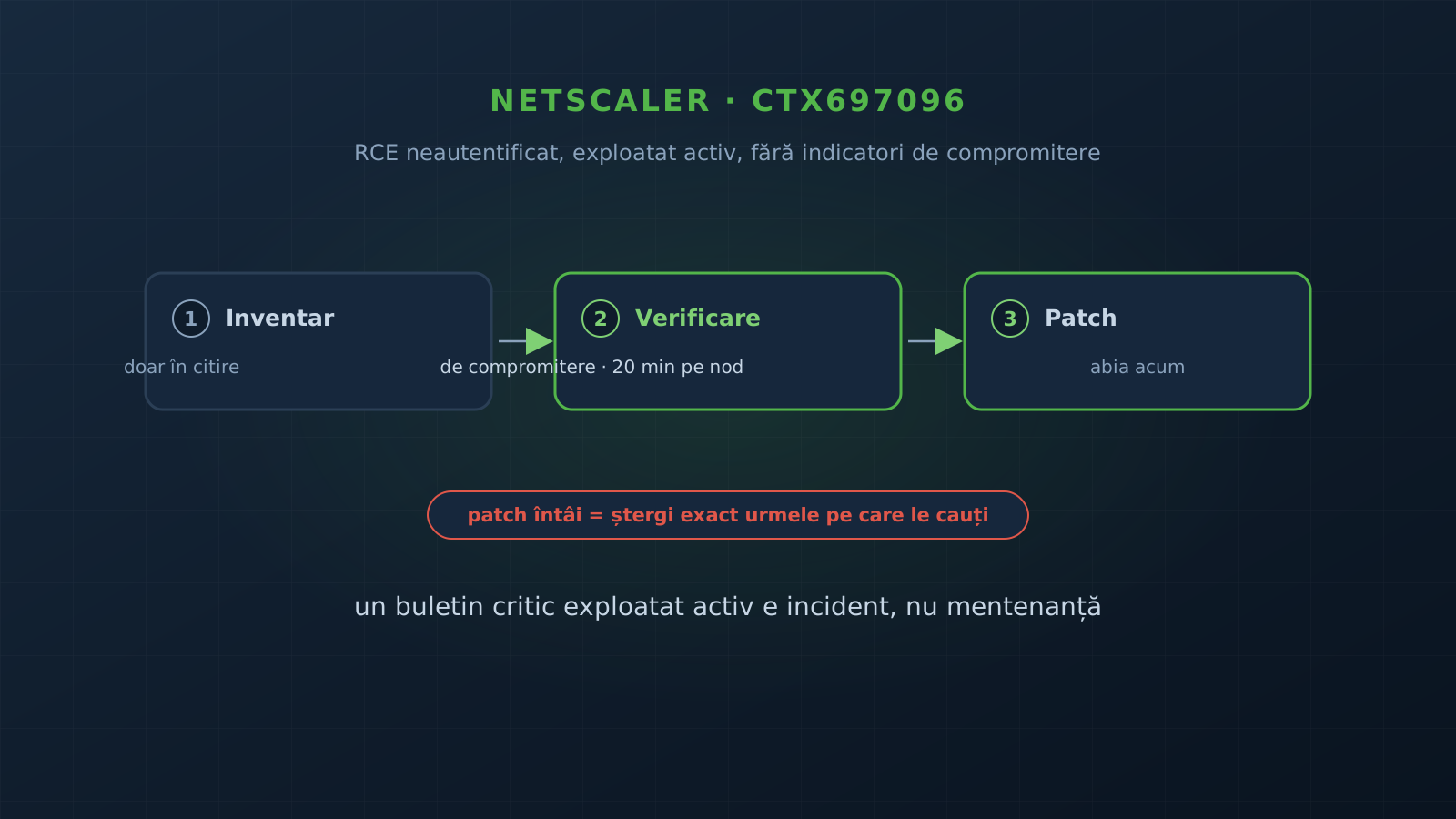
When Citrix published CTX697096, a critical vulnerability already being exploited, with no workaround and no published indicators of compromise, the correct order of work is not ”patch”, but ”first check whether you were already compromised, then patch”. Braincap has worked with several clients running NetScaler ADC and Gateway on exactly this scenario. This article describes the order of work the team uses, what it looks for on the appliances, and what it finds almost every time.
On the afternoon of 27 September 2026, Citrix published bulletin CTX697096 for NetScaler ADC and NetScaler Gateway. The bulletin covers eight vulnerabilities. Two of them were already being exploited at publication, and the most severe, CVE-2026-88771, allows unauthenticated remote code execution on any configuration, including the default one.
For anyone administering NetScaler, the combination is the worst possible. There is no setting that closes the vulnerability until the upgrade. It is not known exactly how it is exploited. There are no official indicators of compromise. The only remediation is the patch, and the patch says nothing about what happened before it.
CTX697096, in brief
| CVE | Type | CVSS 4.0 | Condition |
|---|---|---|---|
| 2026-88771 | Unauthenticated RCE · exploited | 9.5 | Any configuration |
| 2026-88772 | Memory overflow, RCE/DoS · exploited | 9.5 | DTLS enabled (default on VPN vserver) |
| 2026-88773 | HTTP request smuggling | 9.3 | HTTP or SSL vserver (LB, CS, VPN, AAA) |
| 2026-88774 | URL policy bypass | 7.0 | URL-based policies |
| 2026-88775…77 | Memory overflow, DoS | 8.8 | Gateway/AAA, LB ORACLE, FTP, LSN, DNS64, NAT64 |
| 2026-88778 | Predictable TCP ISN | 8.8 | TCP vservers without Enhanced ISN Generation |
Fixed builds: 14.1-73.37, 13.1-64.23 and 13.1-37.279 (FIPS/NDcPP). The 13.0 line is not in the bulletin: it is end-of-life and will not receive a patch.
Update, 30 September 2026: official indicators are out
At the time of the first checks there were no published IoC. On 30 September, Google Threat Intelligence Group and Mandiant published an analysis with indicators and techniques, and GreyNoise confirmed exploitation as early as 24 September. Unit 42 (Palo Alto) went back further still: it observed fingerprinting activity as early as 21 August, with pre-disclosure exploitation running from 21 August to 24 September — the attackers were probing the infrastructure almost five weeks before the bulletin. So it was a real zero-day, used well before the patch. Here is what has been confirmed.
Scale of the campaign. According to Censys, on 28 September more than 42,000 NetScaler ADC and Gateway hosts were exposed on the internet. Google Threat Intelligence Group and Mandiant describe a wave of mass exploitation that began the same day, 28 September, with dozens of organizations affected across government, financial services, technology, education and legal services, in North America and Europe. The two exploited vulnerabilities are CVE-2026-88771 (unauthenticated RCE, delivered via a Base64 User-Agent) and CVE-2026-88772 (memory overflow in DTLS processing).
What the attackers leave on the appliance. Two malware families were named: WHIPSHOT, a PHP web shell that hides Base64 commands in HTTP headers, and SLAPSHOT, a Python tunneler for movement across the internal network. GreyNoise separately documented a web shell masqueraded as a portal file (.ctxs.receiver, with aliases like receiver.min.css).
Persistence and anti-forensics confirmed. The attackers modify httpd.conf to execute non-PHP extensions as PHP (for example .deb or .sig), masquerade the web shells as image requests (.ico routed to scripts), set the SUID bit on /bin/sh, reboot the appliance, then scrub the install-path traces from the logs. That last part confirms why the snapshot and forwarding logs to a SIEM, beforehand, are not optional: local logs can be wiped by the attacker.
New detection signals. In addition to the checks in this article, the published indicators now allow targeted hunting:
- SLAPSHOT artifacts: the files
/tmp/.uxdportand/tmp/.uxdlock; - modified web server configuration:
grep -Eni 'application/x-httpd-php|php_flag|AliasMatch' /etc/httpd.conf; /bin/shwith the SUID (and SGID) bit set (chmod 6555);- C2 headers in requests:
HTTP_NSC_LDAP,HTTP_NSC_CLIENTTYPE,HTTP_X_UX; - in the logs, DTLSv1.0 handshake failures on UDP 443 and NSPPE process crashes, correlated with exploitation over DTLS;
- the CVE-2026-88771 log-poisoning exploitation chain:
grep -i 'pitboss PPE missed too many heartbeats NSPPE' /var/log/ns.log, plus a Base64 payload in a User-Agent insidehttpaccess-vpn.log(the initial stage, logged and later executed); - the
.ctxs.receiverweb shell triggered by cookie: requests carryingCsrfTokentogether withNSC_TASS(the command channel).
Mandiant also published YARA and detection rules for these artifacts, plus scanning and exploitation IP addresses. The full lists and fingerprints are in the sources at the end of the article; use them as signatures, not as an exhaustive list.
Compensating controls if you cannot patch on the spot. Disable DTLS where feasible or restrict UDP 443 at the firewall, because that is where the exploit is delivered. Rotate the certificates, administrator passwords, SSH keys and service accounts, and invalidate active sessions.
Why HTTPS does not protect you
The first reaction the team often hears from clients: ”management is only reachable from the internal network, and the apps are published only over HTTPS”. For this class of vulnerabilities, the argument does not hold. NetScaler is the one that terminates TLS. The attacker’s request is decrypted and reaches the vulnerable HTTP engine exactly like a legitimate request. As long as the exact vector of CVE-2026-88771 is not public, every internet-facing VIP must be treated as a possible attack path.
And the stakes are high. A compromised NetScaler means the TLS private keys of every site behind it, the credentials in the configuration (LDAP service accounts, monitors), the decrypted traffic, and a launch point toward the internal servers.
The order of work: incident, not maintenance
The team treats such a bulletin as an incident, not as scheduled maintenance. The order matters: if you upgrade first and only then ask whether you were compromised, you may erase the very traces you are looking for.
Inventory and exposure, read-only, the first hour. A dedicated account, limited to show and stat commands, and a script that reads the version, the hardware and the current configuration through the NITRO API, then applies the bulletin’s conditions to each appliance. The result is an appliance-by-CVE matrix, with ”vulnerable”, ”not applicable” or ”patched”.
The compromise check, before the patch, about 20 minutes per node. On each node of each HA pair, separately. The details are in the next section.
Upgrade on the HA pair, in the same window. First the secondary node, then failover, then the former primary. On the secondary, before failover, the configuration saved before the upgrade is compared with the one loaded after, to see whether the new version lost objects on load. Then the settings recommended by the bulletin, for example set ns tcpParam -enhancedISNGeneration ENABLED, and running the check script again, until PATCHED appears.
Appliances with no patch: migrate, do not upgrade. For appliances on the 13.0 line there is no patch. The active services are moved to an updated NetScaler, application by application, without changing the public IPs or DNS: the switch is done on the firewall, with the ability to revert in under a minute. After each move, a check from the internet. The old appliances no longer publish anything and are decommissioned.
How you look for indicators when there are no official IoC
At the first checks there were no indicators published for CVE-2026-88771 (they appeared later, see the update above), so the baseline remains the patterns of past NetScaler compromises, the CitrixBleed series and the 2023…2025 campaigns. What it looks for: web shells in the web directories, JavaScript injected into the Gateway login page to steal credentials, persistence through cron or boot scripts, added SSH keys, abnormal processes and connections.
Three rules before the first command. Take a VM snapshot of each node. Work read-only: a suspicious file is not deleted and not moved, it is evidence. Record the session and compute the file’s hash at the end.
The best reference is the other node of the pair. Citrix files are identical on the nodes of the same pair, on the same build. An attacker usually compromises a single node, so any difference between nodes that has no explanation becomes ”to investigate”. All the commands below run in the NetScaler shell and change nothing.
1. Scripts in the web directories
find /var/netscaler/logon /var/vpn /var/netscaler/ns_gui -type f \( -name '*.php' -o -name '*.pl' \
  -o -name '*.py' -o -name '*.sh' -o -name '*.xhtml' \) -exec ls -la -T {} \; 2>/dev/null
Normal: usually a single file, themes/EULA/eula_upgrade.pl, a Citrix script, identical on both nodes.
Alarm: any other .php, .pl, .py or .sh, especially under /var/netscaler/logon or /var/vpn.
2. Login page integrity
grep -o '<script[^>]*src=”[^”]*”' /var/netscaler/logon/LogonPoint/index.html | sort -u
find /var/netscaler/logon -type f \( -name '*.js' -o -name '*.html' -o -name '*.pl' -o -name '*.php' \) \
  -exec sha256 -r {} + | sort -k2 | sha256
The second command produces a single fingerprint for the whole portal. Run on both nodes, if the fingerprints match, the portal is identical. If not, list file by file and compare.
Normal: script sources with relative paths; custom/script.js is the Citrix template, with the example commented out.
Alarm: a script loaded from another domain; fetch, XMLHttpRequest, atob, eval or references to the password field in the portal scripts.
3. Persistence: cron, boot scripts, setuid binaries
grep -v '^#' /etc/crontab; ls -la /var/cron/tabs/; cat /var/cron/tabs/* 2>/dev/null
cat /flash/nsconfig/rc.netscaler 2>/dev/null
find /var /tmp /flash/nsconfig -type f -perm -4000 -exec ls -la -T {} \; 2>/dev/null
Normal: the same cron entries on both nodes; rc.netscaler empty or with known settings; no setuid binary in these directories.
Alarm: curl, wget, nc, perl or python toward external addresses; entries no one on the team can explain.
4. Authorized SSH keys
ssh-keygen -lf /root/.ssh/authorized_keys 2>/dev/null
ssh-keygen -lf /flash/nsconfig/ssh/authorized_keys 2>/dev/null
ls -lc -T /root/.ssh/authorized_keys /flash/nsconfig/ssh/authorized_keys 2>/dev/null
The fingerprints of the authorized keys are compared with the private keys present on the appliance (the pair’s HA communication key). An authorized key with no known private counterpart is a door someone left open. It may be a leftover from an old intervention, it may be something else: in both cases it must have an owner.
5. Processes, connections, web server errors
ps -axo user,pid,ppid,lstart,command | egrep -i '^(nobody|www)' \
  | egrep -i 'sh |bash|perl|python|php|nc |curl|wget|socat'
netstat -an -p tcp | grep ESTABLISHED
zgrep -hiE 'sh: |/bin/sh|base64|wget|curl|\.php' /var/log/httperror.log* 2>/dev/null | tail -40
Normal: no shell started by the web server user; connections only toward the internal networks and between the HA nodes (ports 3008…3011).
Alarm: sh, perl or python processes as nobody; established connections toward unknown public IPs; shell messages in httperror.log. A suspicious process is not stopped before the evidence is saved.
6. Users, management access and forged timestamps
awk -F: '$3==0 || $7 ~ /sh$/ {print $1”:”$3”:”$7}' /etc/passwd
zgrep -h 'Remote_ip' /var/log/ns.log* | sed 's/.*User \([^ ]*\).*Remote_ip \([0-9.]*\).*/\1 \2/' \
  | sort | uniq -c | sort -rn
ls -la -T <file>; ls -lc -T <file>
The last pair of commands is useful for any suspicious file. mtime can be set back with touch, ctime cannot. A file with an old modification date and a ctime from last week was touched recently by someone who wanted it not to show.
7. If you run Gateway or AAA
This is where the campaigns of recent years concentrated. In addition to the above, look in the configuration for rewrite or responder actions that insert <script> or send toward foreign domains, authentication actions (LDAP, RADIUS, SAML, OAuth) toward unrecognised servers, and unusual active sessions (show aaa session, show vpn icaconnection). Do not close the sessions at this stage: that is a decision that comes after escalation.
False positives that can scare you
On the first evening of each such exercise, time is lost investigating perfectly normal things. We leave them here, so you do not lose it too:
| What you see | The explanation |
|---|---|
eula_upgrade.pl recently rewritten | The HA sync daemon (nsfsyncd) periodically rebuilds the whole /var/netscaler/logon tree, so the files appear modified as a group, at the same second. The hash is the same on all appliances and versions. |
/tmp/appfw* | Hundreds or thousands of directories left from Application Firewall jobs. They are not a sign of compromise; they are cleaned up separately. |
| different crontab | NetScaler randomly picks the minute for nslog.sh, so the crontab differs between nodes only in the minute. |
| different JS libraries | jQuery or Hammer with the version in the name, minified differently on the two nodes, left from old upgrades and loaded by no page. |
| 3008…3011 connections | The HA RPC traffic between nodes. It can appear toward ”public” addresses if the pair internally uses address blocks that are not private. |
What Braincap finds almost every time
An audit done in a hurry, under the pressure of a critical bulletin, also surfaces things unrelated to the vulnerability that matter just as much. At clients, a few repeat:
- Two days of local logs. On NetScaler, the default retention is short, and on some old appliances there are cron scripts that delete the performance logs and core dumps daily. Without forwarding to a SIEM, the activity from a week ago can no longer be reconstructed.
- The default RPC password between HA nodes. Whoever reaches the RPC ports can send configuration. It is changed with
set ns rpcNode ... -secure ON. - SSH keys with no owner. Left from old interventions, synced by HA on both nodes, unknown to the current team.
- Forgotten EOL appliances. A NetScaler that has not been rebooted in over two years and still publishes applications on the internet.
- Headers that say too much. The applications announce their web server, the language version, and sometimes even the internal IP of the server. A few global
rewritepolicies remove all of them on every vserver. - Pools with no monitor. The default TCP check keeps ”UP” a server whose application only answers with errors, and the backup server never takes over the traffic.
If you find something
- Stop the check and change nothing. Do not reboot the node, do not kill processes, do not delete files.
- Do not upgrade over a compromised appliance. The upgrade does not remove persistence and can destroy the traces.
- Save the evidence: a new snapshot, the recorded session with its hash, copies of the suspicious files, and
show techsupport -scope NODE. - Escalate. For financial institutions, a major ICT incident has short reporting deadlines under DORA; the decision to isolate and report belongs to the organisation.
- Rebuild, do not clean. A new appliance, from a clean image, on the patched version. Rotate the TLS certificates, the nsroot and administrator passwords, the LDAP or RADIUS service accounts, the RPC passwords. Invalidate the VPN sessions.
What a clean check cannot prove
When all the checked nodes come out clean, that is not a guarantee, and it is right to say so openly. Without official IoC, only the known patterns are searched. The local logs cover few days. The check captures a single moment: an attacker who erased their traces or who runs only in memory does not appear. That is why the pre-upgrade snapshots are kept, the SIEM is searched across the whole exposure window, and the check is repeated when Citrix or the community publishes indicators.
And a clean result does not close the vulnerability. The only remediation remains the upgrade, and for end-of-life appliances the only remediation is to no longer be exposed.
In short
- Treat a critical bulletin with active exploitation as an incident: inventory, check, and only then patch.
- Compare the nodes of the HA pair with each other: it is the best reference you have.
- Send the logs to a SIEM before you need them.
- Do not upgrade over a compromised appliance; rebuild it.
- Take EOL appliances off the internet, even if they ”work”.
Braincap provides compromise checks and remediation plans for NetScaler ADC and Gateway, for clients across several sectors. This article reflects the information available on 29 September 2026; always check the Citrix bulletin for the current fixed versions. Need a check on your own appliances? Get in touch.
Sources
- Citrix: security bulletin CTX697096
- BleepingComputer: Citrix confirms two NetScaler zero-days exploited in attacks
- watchTowr: NetScaler zero-day RCE FAQ (CVE-2026-88771 and CVE-2026-88772)
- Tenable: FAQ on the reported Citrix NetScaler zero-days
- Google Threat Intelligence Group and Mandiant: defending against active exploitation of NetScaler (indicators and techniques)
- GreyNoise: Citrix zero-day exploitation, telemetry and indicators
- The Hacker News: attackers mass-exploit the NetScaler flaw (scale, timeline, sectors)
- Unit 42 (Palo Alto): NetScaler zero-days exploited (timeline from 21 August, the log-poisoning chain, IoC)
Frequently asked questions
What is CTX697096?
A security bulletin published by Citrix on 27 September 2026 for NetScaler ADC and NetScaler Gateway, covering eight vulnerabilities. Two were already exploited at publication, and the most severe, CVE-2026-88771, allows unauthenticated remote code execution on any configuration, including the default. There is no workaround; the only remediation is upgrading to a fixed build.
Management is internal and apps are only on HTTPS, am I protected?
Not for this class of vulnerabilities. NetScaler is the one that terminates TLS, so the attacker's request is decrypted and reaches the vulnerable HTTP engine like a legitimate request. As long as the exact vector of CVE-2026-88771 is not public, every internet-facing VIP must be treated as a possible attack path.
Why check for compromise before patching?
Because a critical bulletin with active exploitation is handled as an incident, not as maintenance. If you upgrade first and only then ask whether you were compromised, you can erase the very traces you are looking for, and the upgrade does not remove an attacker's persistence. The correct order is inventory and exposure, a compromise check on each node, and only then the patch.
How do you look for indicators when Citrix publishes no IoC?
Based on the patterns of past NetScaler compromises (web shells in the web directories, JavaScript injected into the login page, persistence through cron or SSH keys, abnormal processes and connections) and, above all, by comparing the two nodes of the HA pair. Citrix files are identical on the nodes of the same pair on the same build, so any unexplained difference becomes something to investigate.